Brief
Use your own drawings and procedures, or describe the job in your own words. They stay yours.
Anvil’s workflow expert builds your steps, checks and limits from them. Nothing goes live until your shop signs it off.
Console · every job and gate, live
What Anvil is
Rebuild, process and quality management for MRO shops. In the palm of your hand.
Your procedures, inspections, repair scope, gates and sign-offs, on the phone or tablet at the bench and live in the office. Anvil’s workflow expert builds it from your own documents; your shop signs it off.
§01 · Why · sound familiar?
The extra damage found on day three never made the quote.
The readings are on a scrap of paper in someone’s pocket.
“Where’s that job?” means a walk to the floor.
Final assembly finds a part was never ordered.
The customer disputes the work.
Two inspectors, same job, two different results.
Phone · the same jobs, on the floor
§02 · How it works
In
Your procedures, travellers, checklists, drawings and limits.
Anvil
Your routes, checks, holds and sign-offs, versioned and yours.
Out
The screens your people work in, live on the floor and in the office.
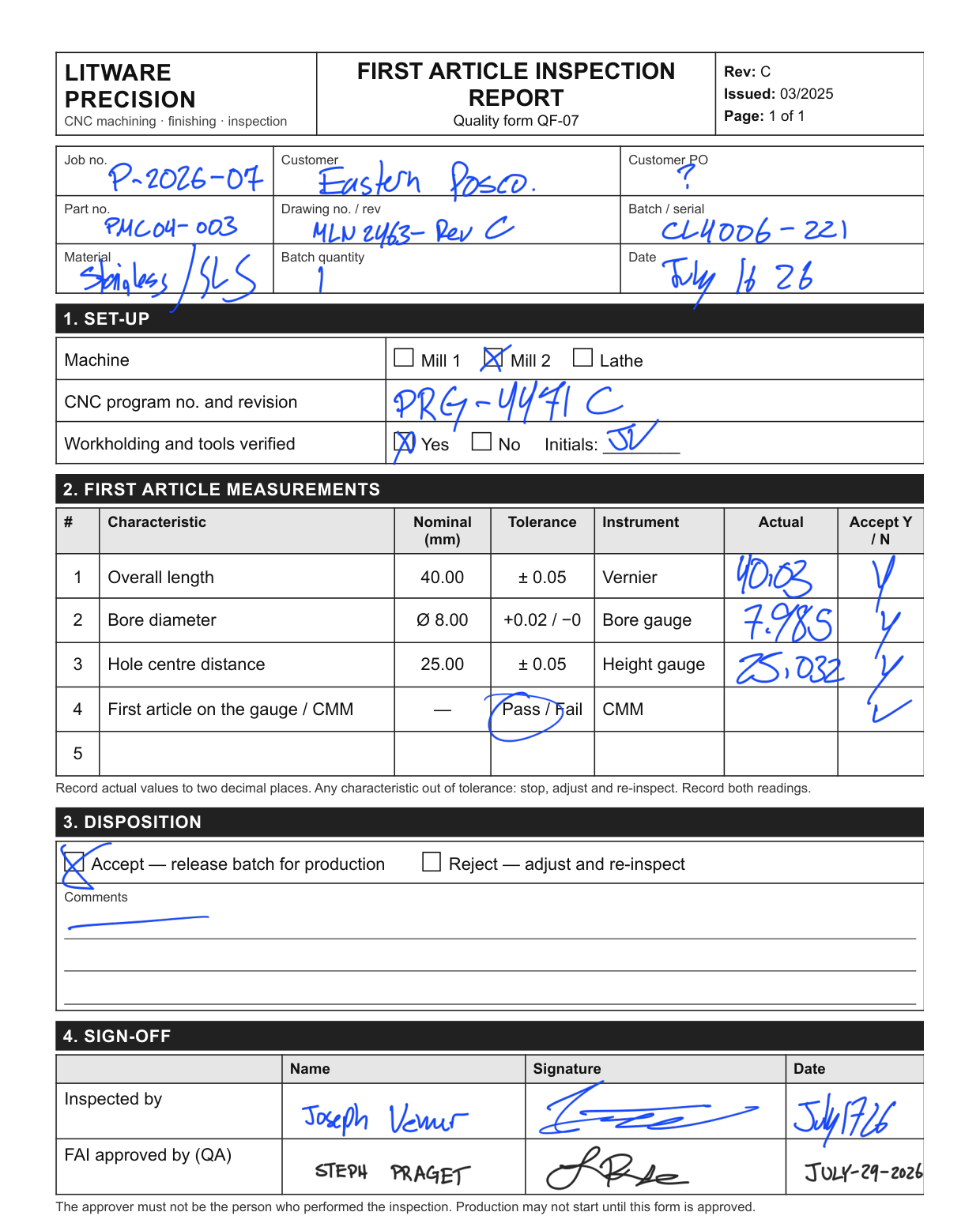
Before · the bench form
After · the step
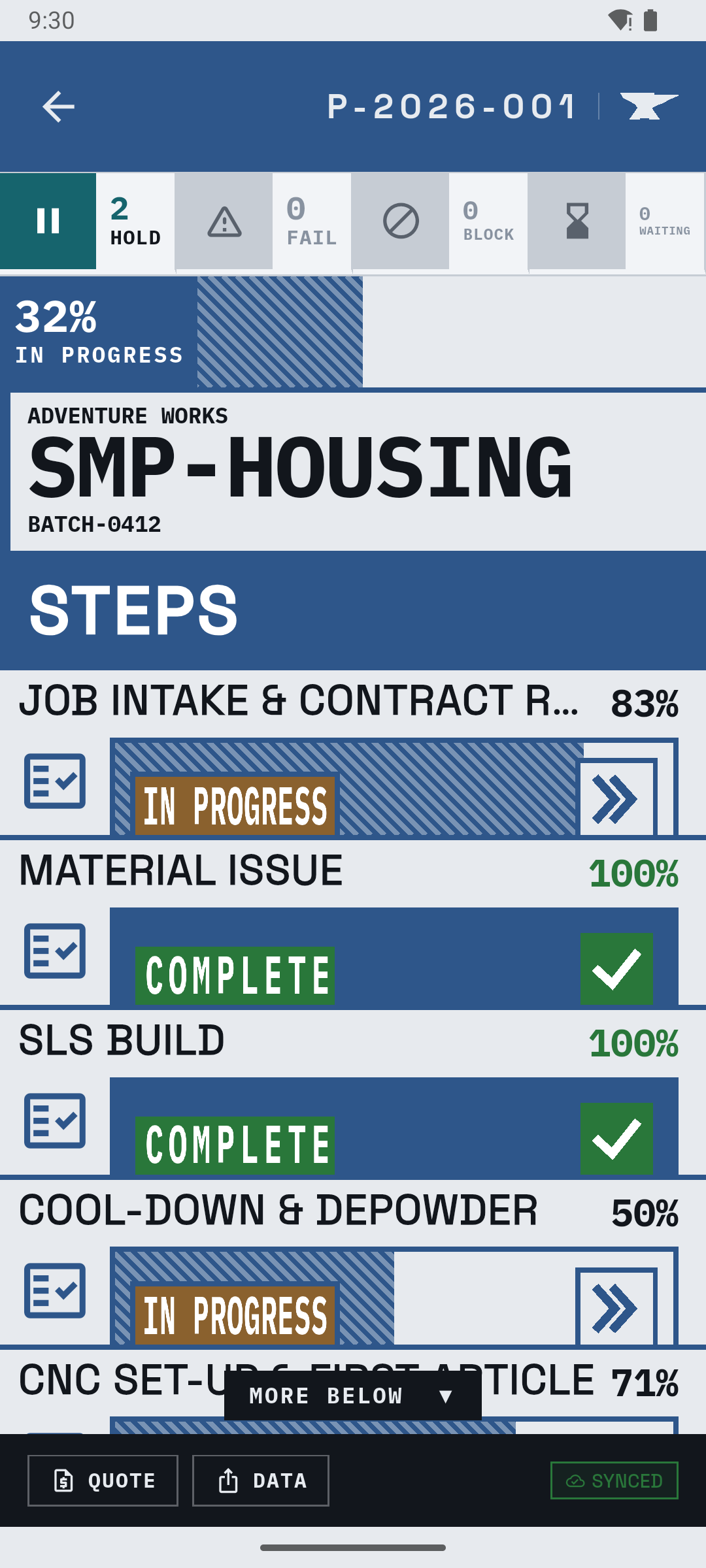
What changes
§03 · Onboarding, built in
Brief
Use your own drawings and procedures, or describe the job in your own words. They stay yours.
Anvil’s workflow expert builds your steps, checks and limits from them. Nothing goes live until your shop signs it off.
RouteThe steps your shop runs, per job type.
SheetsWhat to check and measure, with your limits.
GatesStop the right step, and show everyone why.
RecordsWho, what, when and the result. Per step.
A procedure built from a drawing package
§04 · Gates
Waiting on a sign-off. Nothing after it starts.
Cleared byA signature, by someone with the authority
A check came back out of limits. Both results stay on record.
Cleared byA new measurement, in limits
Something real is in the way: no material, a machine down, no answer from the customer.
Cleared byThe obstacle going away
Depends on another step: print can’t finish until material is issued.
Cleared byThe step it waits on
Gate register · every gate, on every screen
§05 · Stage 01
Brief
On the phone or tablet your team already carries. No signal needed. Readings checked against your limits as they’re typed.
Offline, by design
No signalThe work carries on. Every reading and photo is saved on the device first.
Signal backThe device sends what changed. Nothing on the server is overwritten.
Two devices, one recordFlagged on both. A person checks it, and both versions stay on record.
Readings on a phone
§06 · Stage 02
Brief
The findings build the scope. The scope builds the price. Nothing typed twice.
06.3 · Findings
A worn bore, a cracked weld, a damaged part. Recorded on the floor, with photos.
06.4 · Scope
06.5 · Price
The quote comes straight from the record.
§07 · Stage 03
Brief
Every step leaves a record: readings, results, who signed and when.
Evidence for your audit
The job record is your written procedure and the proof you followed it: the kind of evidence an ISO 9001 audit looks for. Your certification, quality manual and audits stay yours, and so does the evidence: Anvil records it for you to export whenever you need it.
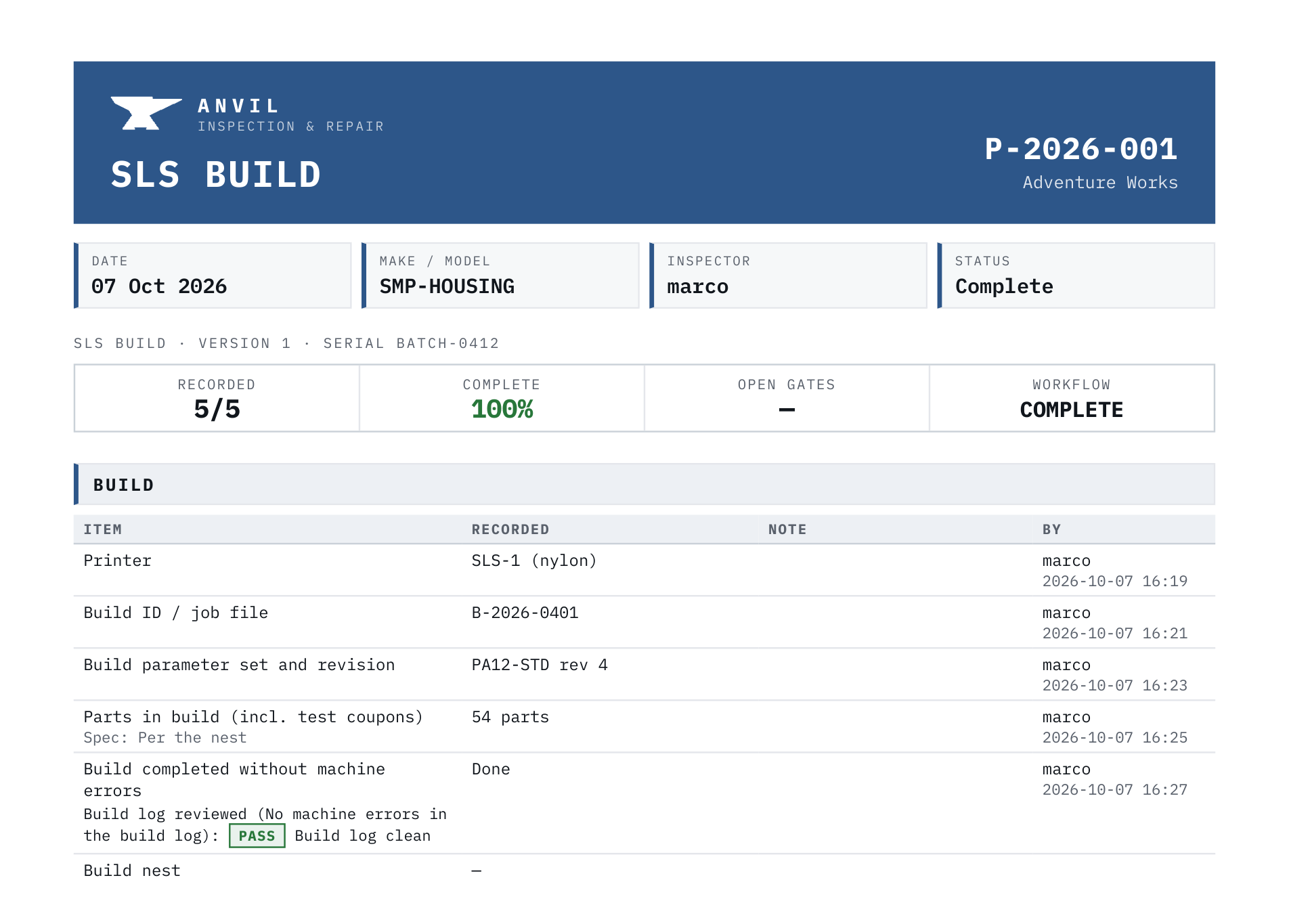
PDF for the auditor, spreadsheet for the office, every photo in one download.
A step record as a PDF
§08 · Stage 04
Brief
Your whole shop at once: every job, every step, every gate. What’s next, what’s about to slip, and where the next hour counts most.
Priority board
StripMachWeldCoatAssyQCDepartment load · by priority
Done Working Queued Gated
Machining queue · CNC 2
Backlog vs capacity · this week
Next best hourChase the 6061 bar for P-2026-007: it frees the line-bore and keeps Wednesday.
Machining is 6 h over. Ask your shop what to move. Ask ↓
§09 · Ask your shop
Brief
Ask in plain English. The answer comes from what’s actually happening on the floor.
Real answers
“What will miss Friday?” Answered from the live record.
Drafts the plan
Tomorrow’s priorities and this week’s risks.
Ours, or bring your own
Connect your own assistant through Anvil’s MCP layer.
People decide
Every proposed change waits for a person.
Example session
Where’s P-2026-004, and what’s holding it up?
P-2026-004 · Fabrikam Fluid Power · 74%
Coat / anodise is in progress, 4 of 5 loads done. Next is final inspection, then a HOLD: release for shipment needs a sign-off.
Due tomorrow. On track if the last load runs today.
Which jobs will miss their date this week?
Two at risk.
P-2026-007 is BLOCKED waiting on 6061 bar. P-2026-006 has a FAIL on first article: re-measure before production can start.
Draft tomorrow’s priorities for the CNC cell
§10 · Security & data
Your own instance
Each customer runs on its own server instance: its own database, service and photo storage, separate from every other shop.
Encrypted
The tablet’s database encrypted on the device. HTTPS for every connection. Backups encrypted before they leave the server.
Never rewritten
A change is a new version, with who and when. The database itself refuses to alter the old one.
Backed up nightly
Off site, locked against change for 30 days, and restores tested.
Access you control
Roles per person. Devices paired to your shop and revoked in one click. Every sign-in logged.
Yours to take
Export everything at any time. If you leave, you take a complete copy with you.
Who builds Anvil
Built and run by its founder, who answers hello@anvilmro.com.
§11 · Contact
Brief
Pick one of your current jobs and we’ll run it through Anvil with you, start to finish.
Your data is your own
Your procedures, your records, your photos: all of it belongs to your shop. Export it any time.
NDA before the first screen
We sign your NDA before anything is shown or shared.
Your workflow, digitised
Anvil fits your floor, not the other way round.
Built for
Mining & heavy equipment overhaul
Built for
Component repair & rebuild
Also used for
Machining & fabrication
Also used for
Coating & additive manufacturing
Also used for
Assembly & manufacturing
